repo-atlas

Your workspace has dozens of repositories.
You remember what a handful of them do.
工作目录下有几十个仓库。
你记得清其中几个。

repo-atlas reads what is actually in each one — README, source, git history — and writes a catalog. One HTML page for people. One compact index for coding agents, so they stop walking your filesystem. repo-atlas 逐个读进去——README、源码、git 历史——写成一份目录。人看一张 HTML 页面,AI 读一份紧凑索引,不用每次现翻文件系统。

Get started开始使用 Source on GitHubGitHub 源码

Full catalog run全量编目

$1.33

74 directories, 3 min 04 s74 个目录,3 分 04 秒

Re-run, cached重跑命中缓存

$0

5 seconds, no model calls5 秒,不调模型

Agent index给 AI 的索引

3.2K

tokens for all 74token,覆盖全部 74 个

API keys needed需要的 API key

0

uses your Claude Code login用你已登录的 Claude Code

What you get做出来是什么样

One page, six views 一个页面,六个视图

Everything below is a real screenshot of a real generated page — the tool run against a sample workspace of 18 repositories. The page is a single HTML file: open it from disk, copy it to a colleague, put it on any static host. 下面全部是真实产物的截图——工具跑在一个 18 个仓库的示例工作区上生成的。页面就是一个 HTML 文件:从磁盘直接打开、拷给同事、放任何静态托管都行。

Open the live demo打开可交互演示 Real output, sample data. Search with /, click anything. 真实产物 + 示例数据。按 / 搜索,随便点。

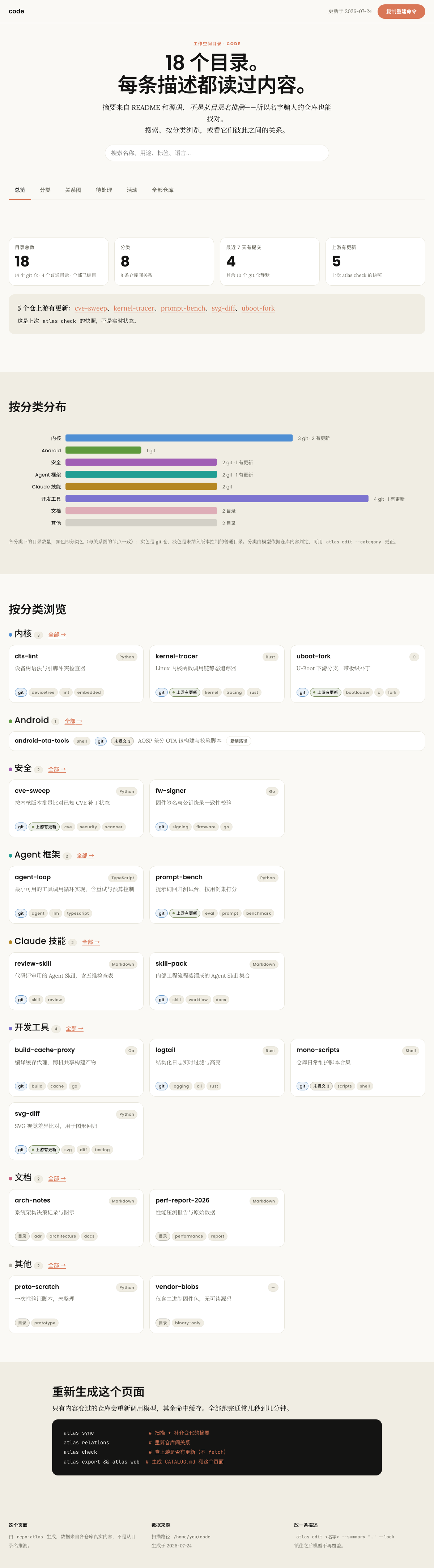
总览视图:统计条、上游更新提醒、分类分布条形图、按分类的卡片墙
Overview. Four figures that each answer a question you cannot read off another tile, an alert for repositories whose upstream moved, a distribution split by whether a directory is under version control, then the catalogue itself grouped by category. 总览。四个统计块各自回答一个别处读不到的问题,上游有更新的仓单独提示,分布图按"是否纳入版本控制"拆分,下面是按分类分组的目录本体。
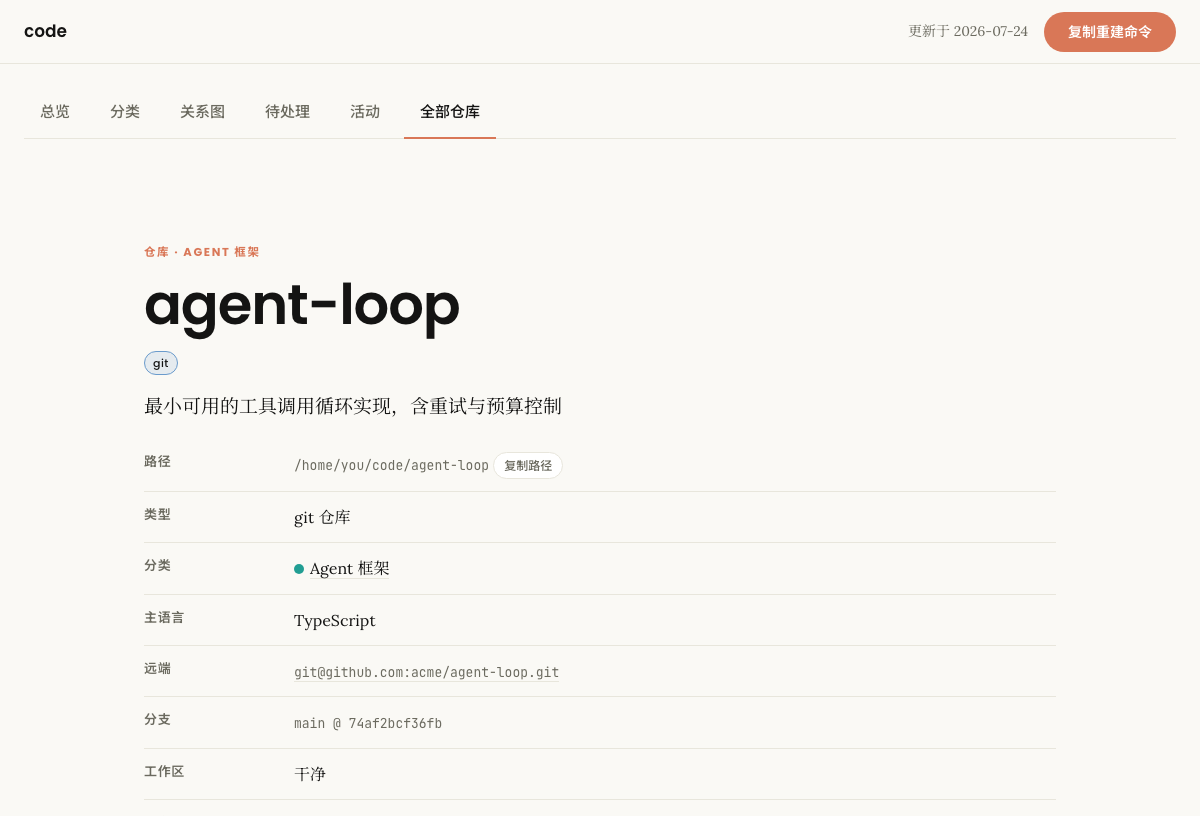
单仓详情视图:状态表、判断依据、相关仓库、最近提交
Repository detail. Remote, branch, working-tree state, upstream status, disk size, a README excerpt and tree preview, a one-hop relation graph, and a copy-path button — enough to answer "is this the repo I want" without cd-ing over. 单仓详情。远端、分支、工作区状态、上游状态、磁盘占用、README 摘录与目录结构、一跳关系小图、一键复制路径——不用 cd 过去就能确认"这是不是我要找的仓"。
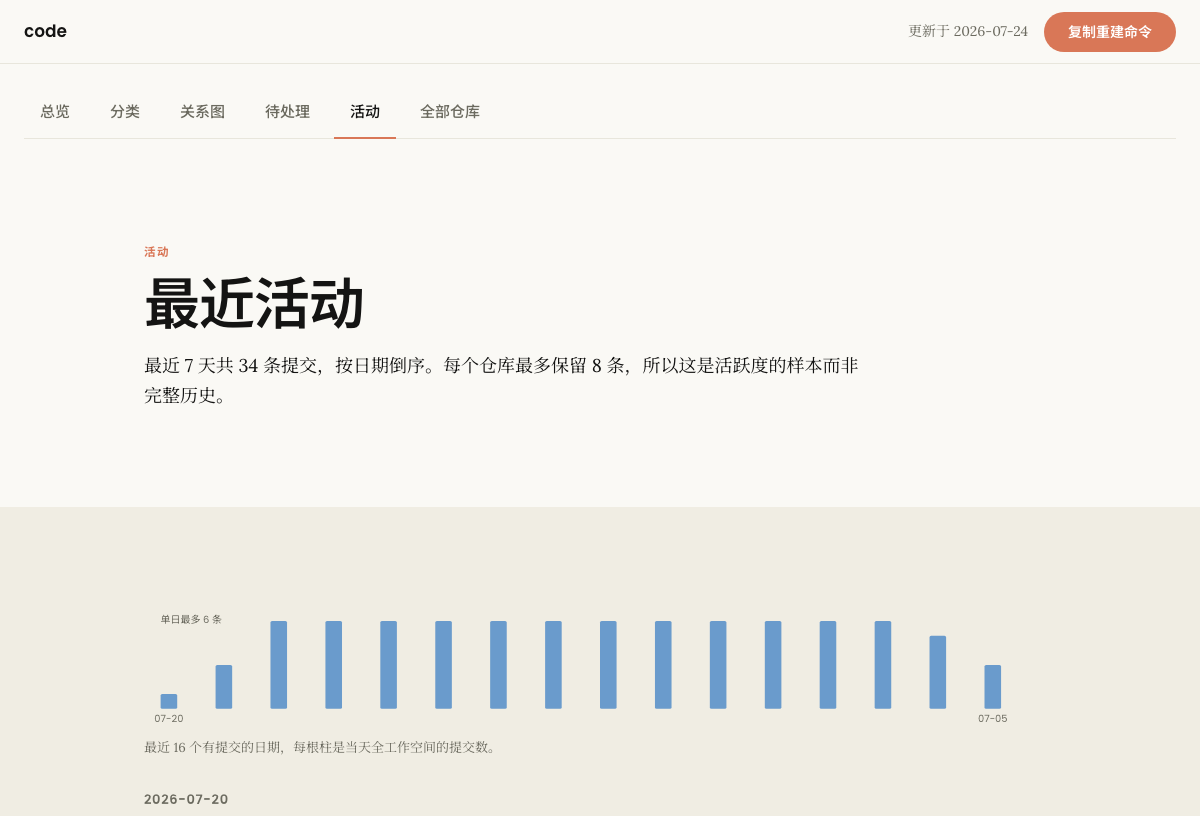
活动视图:每日提交条形图与按天分组的提交时间线
Activity. Commits across the whole workspace, so "what have I actually been working on" has an answer that does not require opening eighteen terminals. 活动。全工作区的提交,"我最近到底在做什么"这个问题不用开十八个终端才能回答。
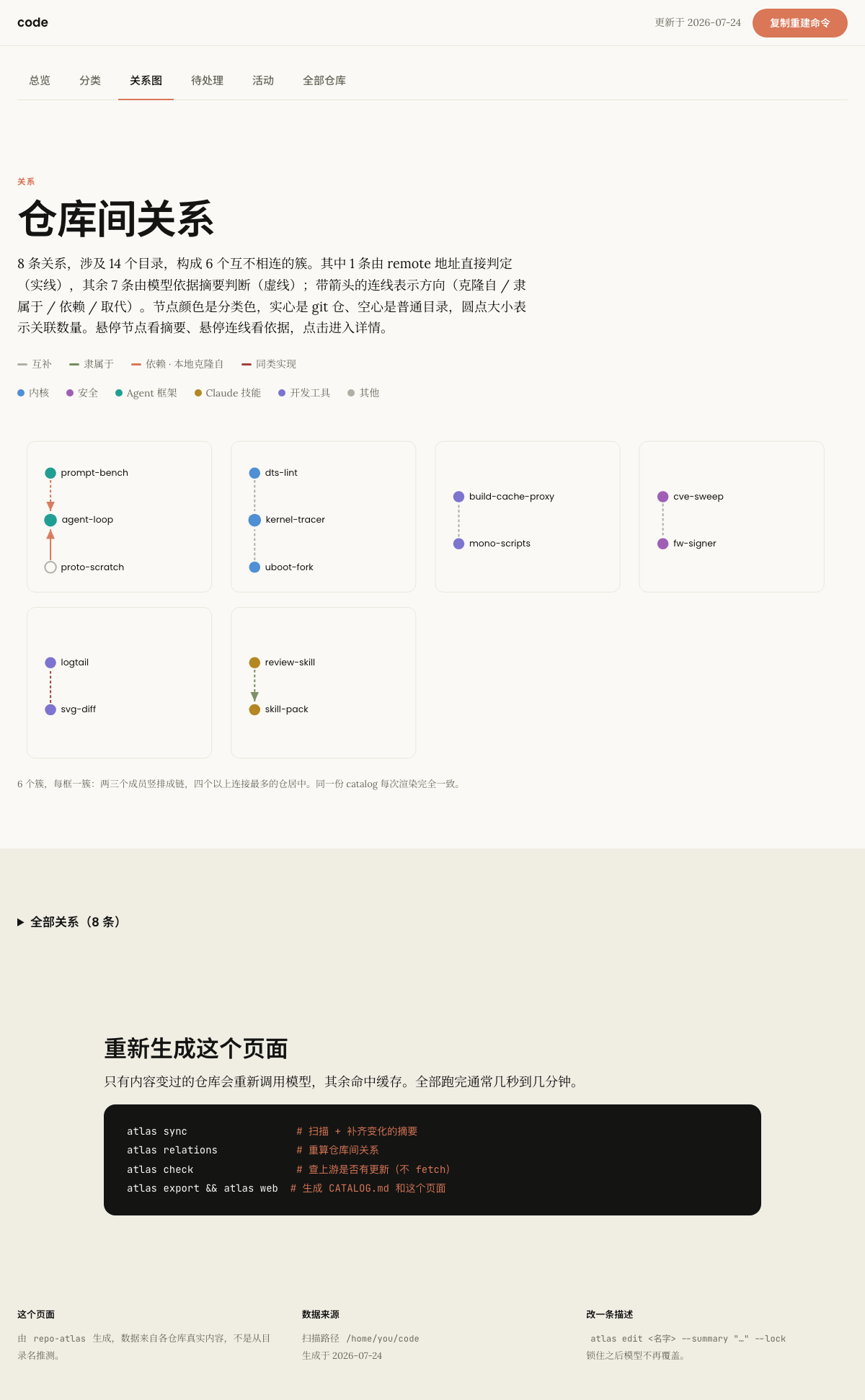
关系视图:每个簇一格全部画出,节点按分类着色,方向性关系带箭头,下方是可折叠的全部关系表
Relations. Every cluster is drawn, one cell each — pairs and chains stack vertically, bigger clusters go hub-and-spoke. Node colour is the category (filled: git repo, hollow: plain directory), arrowheads mark directional relations, solid edges are proved from remote URLs and dashed ones are a model's judgement. Hover a node for its summary, hover an edge for the evidence, click through to the detail page. 关系。所有簇都画成图,每框一簇——成对成链的竖排,大簇连接最多的居中。节点颜色是分类色(实心 git 仓、空心普通目录),方向性关系带箭头,实线是 remote 地址证明的、虚线是模型判断的。悬停节点看摘要、悬停连线看依据,点击进详情。

The page has no server behind it. Theme, data and router are all inlined, and routes are hash-based — so deep links, the back button and sharing all work from a file:// URL. The demo above is the same file, served as-is. 这个页面背后没有服务器。主题、数据、路由全部内联,路由走 hash——所以深链接、后退键、分享在 file:// 下都正常。上面那个演示就是同一个文件原样放上去的。

Background背景

Directory names lie 目录名会骗人

A workspace that has been in use for a year accumulates dozens of repositories: tools you wrote, upstreams you cloned, a directory holding one investigation, another holding two documents. Six months later the name alone tells you nothing. 一个用了一年的工作目录会攒下几十个仓库:自己写的工具、clone 的上游、只放了一次调研的目录、只有两个文档的目录。半年后,光看名字什么也想不起来。

The pattern repeats in every workspace that has been lived in. A name records what you intended when you made the directory; the contents record what actually happened afterwards. 这个模式在任何用久了的工作区都会重复。名字记录的是建目录那一刻的打算,内容记录的是之后实际发生的事。

<tool>-cli Name promises: a command-line tool 名字承诺的:一个命令行工具 Actually: one design note. The tool was never written. 实际是:一篇设计笔记。工具从来没写。 1 file · 0 lines of code 1 个文件 · 0 行代码 <product>-notes Name promises: notes about that product 名字承诺的:关于那个产品的笔记 Actually: a working script that generates reports. 实际是:一个能跑的报表生成脚本。 8 files · JavaScript · no notes at all 8 个文件 · JavaScript · 一条笔记都没有
Both shapes were hit while building this. A directory like these gets the right description only after a model is given tool access and sent to read what is in it; a hand-written index would carry the wrong one indefinitely. 这两种形态在开发过程中都遇到过。这类目录只有在给模型开了工具权限、派进去读实际内容之后才会被描述对;手写清单会把错的那条一直带下去。

A hand-written index is not the answer. It goes stale. The entry doc for one project in this same workspace sat unchanged for two months while the thing it described kept moving. That is the failure this tool exists to remove — the catalog is regenerated from content, so it cannot drift away from what is on disk. 手写清单解决不了问题——它会过期。同一个工作区里,某个项目的入口文档停更了两个月,而它描述的东西一直在变。这正是这个工具要消灭的失效模式:目录从内容重新生成,不会和磁盘上的真实情况脱节。

Design设计

One data layer, four ways out 一份数据,四个出口

The catalog is plain YAML under version control — one file per repository, hand-editable, git diff-able. Everything else is generated from it. catalog 是纳入版本控制的普通 YAML——一个仓库一个文件,人可手改,git diff 看得清。其余产物全部由它生成。

roots: [ ~/code, ~/work ] configured workspace paths 配置的工作空间路径 Scan · git and filesystem facts 扫描层 · git 与文件系统事实 remote · branch · HEAD · dirty · languages · README · recent commits — no model, seconds remote · 分支 · HEAD · 是否脏 · 语言 · README · 最近提交 —— 不调模型,秒级 Enrich · summary, tags, category 富化层 · 摘要、标签、分类 T0 · $0 degenerate dirs 退化目录 T1 · $0.0065 6 repos per call 6 仓一次调用 T2 · $0.074 reads the source 进去读源码 catalog/<name>.yaml one file per repo · version controlled · the single source of truth 一仓一文件 · 纳入版本控制 · 唯一事实源 atlas list / show terminal 终端查询 CATALOG.md 3.2K tokens, for agents 3.2K token,给 AI 读 atlas.html single file, for people 单文件,给人看 SKILL.md agent instructions 给 agent 的使用说明
Blue is free and mechanical, orange costs money, green is generated output. The scan layer runs on every command because it is cheap; the enrich layer runs only on what changed. 蓝色是零成本的机械判定,橙色要花钱,绿色是生成的产物。扫描层每条命令都跑(因为便宜),富化层只处理变化的部分。

Facts and meta are kept apart facts 和 meta 分开存

Each record has two halves with different owners. The scanner overwrites facts wholesale on every run; meta belongs to the model or to you, and honours locked: true. That split is what keeps a diff on the catalog readable: a commit that only moved HEAD forward touches facts and leaves your corrected description alone. 每条记录分成两半,归属不同。扫描器每次运行整体覆盖 facts;meta 归模型或你所有,且遵守 locked: true。这个拆分让 catalog 的 diff 可读:一次只挪动了 HEAD 的提交只会改 facts,你手工改过的描述不会被动。

name: example-parser
path: /home/you/code/example-parser
vcs: git                       # git repo, or "none" for a plain directory
facts:                         # scanner owns this — overwritten every run
  remote: git@github.com:someone/example-parser.git
  branch: main
  head: 1d9d911e55ac
  dirty: false
  primary_language: Rust       # from Cargo.toml, not from counting files
  file_count: 767
  source_hash: d072a269        # changes here trigger a re-summary
meta:                          # model or human owns this
  summary: Incremental parser for a config DSL
  tags: [parser, rust, cli]
  category: devtool
  tier: 1                      # which layer produced it
  locked: false                # true = the model never overwrites it

Routing分流

Spend the model only where it changes the answer 只在模型能改变答案的地方花钱

Reading source code costs eleven times what reading a README costs. Most repositories do not need it. The routing is mechanical — no human decides which tier a repository goes to. 读源码的成本是读 README 的十一倍,而大多数仓库不需要。分流是机械判定,走哪一层不需要人来定。

every directory 每个目录 74 source_hash changed? 变过吗? no 否 cache hit · $0 命中缓存 · $0 the usual case on a re-run 重跑时的常态 yes 是 readable text? 有可读文本吗? text_file_count no 否 T0 · $0 empty / binary-only, described in code 空目录 / 纯二进制,代码直接描述 yes 是 README ≥ 400 B? README ≥ 400 字节? no 否 yes 是 T1 · $0.0065 / repo 6 repos batched into one call 6 个仓打包成一次调用 README + directory shape only 只看 README 和目录结构 T2 · $0.074 tools granted, 开工具权限, reads the source 进去读源码 low 低 Escalation is self-reported 升级由模型自评触发 T1 returns a confidence field. When the model says the material was not enough to tell what a repo really does, that repo T1 返回一个 confidence 字段。当模型自己说材料不足以判断这个仓到底做什么时,这个仓 is queued for T2 rather than shipping a confident-sounding guess. On this workspace three repositories took that path. 会被排进 T2,而不是把一个听起来笃定的猜测写进目录。这个工作区里有三个仓走了这条路。
Blue diamonds are decisions made in code. On the 74-directory workspace used for the benchmark: 5 stopped at T0, 57 went through T1, and 14 needed T2 — including three that T1 escalated on its own. 蓝色菱形是代码里的判定点。在用于跑基准的那个 74 目录工作区上:5 个止步 T0、57 个走 T1、14 个需要 T2——含 T1 自己升级上来的三个。

Economics成本

Why one call per repository is the wrong shape 为什么"一仓一次调用"是错的形状

Every claude -p invocation carries the CLI's own system prompt, its skill list and its tool definitions — about 20,000 tokens before your prompt starts. Against a 2,000-token request that is 90% overhead, paid 74 times. 每次 claude -p 调用都会带上 CLI 自己的系统提示、skill 列表和工具定义——在你的 prompt 开始之前就已经约 20,000 token。对一个 2,000 token 的请求来说这是 90% 的开销,而且要付 74 次。

It cannot be stripped. Replacing the system prompt, emptying the setting sources and passing an empty MCP config were all measured: input stayed at 21K, and changing the system prompt additionally broke the prompt cache, making a single call more expensive. The only lever that works is amortisation. 这部分砍不掉。替换系统提示、清空 setting sources、传空 MCP 配置——都实测过:输入仍是 21K,而且换系统提示还会让 prompt cache 失效,单次调用反而更贵。唯一有效的手段是摊薄。

One repo per call 一仓一次调用 fixed CLI overhead · ~20,000 tokens 固定开销 · 约 20,000 token 2K the actual work 真正的业务内容 × 74 calls = $2.54 Six repos per call 6 仓一次调用 same fixed overhead, paid once for six 同样的固定开销,六个仓只付一次 12K 6 repos 6 个仓 ×13 = $0.43 6.3× cheaper per repository — same model, same prompt, same output quality 单仓成本降到 1/6.3 —— 同一个模型、同样的提示、同样的输出质量 The batch has one failure mode: a model may silently return five records for six repos. Compare returned names against sent names, then retry the gap. 批处理有一个失效模式:模型可能给 6 个仓静默返回 5 条。要比对返回的 name 集合与送入的集合,把漏掉的单独补跑。
Measured on Claude Code 2.1.215 with Haiku. The lesson generalises: whenever a per-call fixed cost dominates the payload, batch the payload rather than trying to shrink the overhead. 在 Claude Code 2.1.215 + Haiku 上实测。这个结论可以推广:只要每次调用的固定成本压过了业务负载,就该把负载打包,而不是试图砍开销。

Relations关系

Some links are provable, the rest need judgement 有些关系可以证明,其余的需要判断

Relations are a property of the whole set — no amount of asking about one repository in isolation reveals that two directories are the same idea implemented twice. So this runs as a single pass over every summary. But a good share of it never needs a model at all. 关系是整个集合的属性——逐个问单个仓库,永远问不出"这两个目录是同一想法的两种实现"。所以它作为一次全量 pass 运行。但其中相当一部分根本不需要模型。

all repository records 全部仓库记录 Pass A · proved from remote URLs · $0 A 段 · 由 remote 地址直接判定 · $0 local-clone-of remote points into this same workspace remote 指向工作空间内的本地路径 duplicate-of two directories, one remote 两个目录指向同一个 remote fork-family same repo name, different owner 同名上游,owner 不同 Pass B · judged from every summary at once B 段 · 全部摘要一次喂入模型判断 All 74 summaries fit in ~6K tokens, so the model sees the whole 74 条摘要一共约 6K token,模型能一次看到整个 workspace in one context. It is told what Pass A already proved, 工作空间。A 段已判定的结果会告诉它, so it spends attention on what only judgement can settle: 让它把注意力放在只有判断才能定的部分: same-idea-as · depends-on · part-of supersedes · complements known 已知
On this workspace Pass A found 3 of the 26 relations for free — including a repository whose remote pointed at another directory two levels up. Pass B found the remaining 23 in a single call. 这个工作区里 A 段零成本找到了 26 条关系中的 3 条——包括一个 remote 指向上层另一个目录的仓库。B 段用一次调用找到了其余 23 条。

Features功能

What it does 它做什么

Catalogues everything全部收录

Git repositories and plain directories alike, each marked with which it is. A workspace is not only its checkouts — the folder holding one investigation matters as much as the fork you cloned last week, and you are just as likely to forget it. git 仓库和普通目录一并收录,各自标明是哪种。工作空间不只是那些 checkout——只放了一次调研的目录,和你上周 clone 的 fork 一样重要,而且一样容易忘掉。

Never fetches从不 fetch

Upstream checks use git ls-remote, which reads the remote's refs and nothing else. No objects are downloaded, no working tree is touched, no branch moves. A catalogue tool has no business mutating what it describes. 上游检测用 git ls-remote,只读远端的 ref。不下载任何对象、不碰工作区、不移动分支。编目工具没理由去改它所描述的对象。

Corrections stick改过的不会被覆盖

atlas edit --lock pins a description you fixed by hand, and the model never overwrites a locked record. Corrections belong on disk, not in a chat log that ends when the session does. atlas edit --lock 锁住你手工改对的描述,模型不会覆盖已锁定的记录。纠错应该落到磁盘,而不是留在一段会话结束就没了的对话里。

Language from manifests语言按 manifest 判定

A root Cargo.toml or pyproject.toml beats counting files. Counting called a Rust project TypeScript, and a Python one too — front-end files are many and small, so they win any tally that treats every file as one vote. 根目录的 Cargo.toml 或 pyproject.toml 优先于文件计数。按文件数统计把一个 Rust 项目和一个 Python 项目都判成了 TypeScript——前端文件又多又小,在"一个文件一票"的统计里必然赢。

Resumable可续跑

Each result is written the moment it arrives, so an interrupted run loses nothing but the call in flight. The next run picks up only what is missing, and a batch that fails is retried in halves rather than resent whole. 每条结果一到就立即落盘,中断只损失正在飞的那一次调用。下次运行只补没做完的部分;失败的批次会折半重试,而不是整批重发。

Bring your own model模型可换

Claude CLI by default with no key to manage, then the Anthropic API, then any OpenAI-compatible endpoint — which covers ollama, vLLM and LM Studio running entirely on your machine — then none at all. 默认 Claude CLI,不用管 key;其次 Anthropic API;再次任何 OpenAI 兼容端点——覆盖完全跑在你本机上的 ollama、vLLM、LM Studio;也可以完全不接模型。

Model backends 模型后端

Autodetected at atlas init. Only the Claude CLI backend supports T2, because only it can grant a model file-reading tools; the others report skipped repositories honestly rather than guessing. atlas init 时自动探测。只有 Claude CLI 后端支持 T2——因为只有它能给模型开文件读取工具;其他后端会如实报告跳过了哪些仓,而不是硬猜。

claude-cli no API key · uses your login 无需 API key · 用你的登录 supports T2 支持 T2 读源码 anthropic-api $ANTHROPIC_API_KEY T1 only 仅 T1 openai-compat ollama · vLLM · LM Studio T1 only · runs fully local 仅 T1 · 可完全本地运行 none scanning still works; 扫描照常工作; you write the summaries 摘要由你自己写
Detection order, best first. Set provider.type in atlas.yaml to override. 探测顺序,从优到次。在 atlas.yaml 里设 provider.type 可以指定。

Configuration配置

Which paths to scan, and what to leave out 扫哪些路径,不扫哪些

One file, atlas.yaml, at the root of your catalog directory. atlas init writes it for you; everything in it can be edited afterwards by hand. 一个文件 atlas.yaml,放在 catalog 目录根部。atlas init 会替你写好;之后所有项都可以手改。

Several paths at once 一次指定多个路径

roots is a list. Point it at as many workspaces as you like — work and personal, or one per client — and they are catalogued together into a single index. roots 是一个列表。想指多少个工作区都行——工作和个人分开、或者一个客户一个——它们会被编进同一份索引。

# 命令行指定,--root 可重复
atlas init --root ~/code --root ~/work/vendor --root /srv/checkouts

Leaving repositories out 忽略某些仓库

ignore takes glob patterns, matched three ways so the obvious thing works however you write it: against the directory name, against the path relative to its root, and against any single path segment. ignore 接受通配规则,三种方式同时匹配,所以怎么写都能按直觉生效:匹配目录名、匹配相对 root 的路径、匹配路径中任意一段。

roots — scanned roots —— 被扫描 ~/code/ kernel-tracer logtail arch-notes not a git repo — still catalogued 不是 git 仓 —— 一样收录 old-backup ~/work/vendor/ uboot-fork node_modules archive whole subtree skipped 整棵子树跳过 ignore — skipped ignore —— 被跳过 "*-backup" by name pattern 按名字通配 "archive" any path segment 路径任意一段 "vendor/tmp-*" path relative to root 相对 root 的路径 Defaults already cover node_modules, .venv, target, dist… 默认规则已含 node_modules、.venv、target、dist… catalog/ — 3 entries kernel-tracer · logtail · arch-notes · uboot-fork kernel-tracer · logtail · arch-notes · uboot-fork atlas scan --dry-run prints both lists, writes nothing 把两份名单都打出来,不写任何文件
Blue is scanned, red is skipped, gray is a directory that is not a git repository — catalogued all the same. Run atlas scan --dry-run before committing to a config: it prints exactly what would be included and what was filtered out. 蓝色是被扫的,红色是被跳过的,灰色是"不是 git 仓但一样收录"的普通目录。改完配置先跑 atlas scan --dry-run:它会把"会收录哪些"和"被忽略哪些"两份名单都打出来。

The whole file 配置文件全貌

workspace_name: code           # shown in the page title
roots:                         # scan these, in order
  - /home/you/code
  - /home/you/work/vendor
depth: 1                       # 1 = direct children only
ignore:                        # glob; name, relative path, or any segment
  - "*-backup"
  - "archive"
  - "vendor/tmp-*"
  - node_modules               # defaults are kept unless you replace them
  - .venv
  - target
output_language: zh            # zh | en — language of generated summaries
categories:                    # the model must pick one of these
  [kernel, android, security, agent-framework,
   claude-skill, devtool, docs, other]
provider:
  type: claude-cli             # claude-cli | anthropic-api | openai-compat | none
  shallow_model: haiku         # the batched per-repo pass
  deep_model: haiku            # the read-the-source pass
  relations_model: sonnet      # the one global pass — needs more judgement
enrich:
  batch_size: 6                # repos per model call — see the cost section
  parallel: 4                  # concurrent calls
  deep_budget_usd: 0.15        # hard ceiling per deep call
  min_readme_bytes: 400        # below this, skip T1 and read the source
  readme_truncate: 2500        # chars of README sent to the model
Task要做的事 How怎么做
Add another path再加一个路径 Append to roots, then atlas sync. Existing entries are untouched.往 roots 里加一行,然后 atlas sync。已有条目不受影响。
Skip one repository跳过某一个仓 Add its directory name to ignore. It is dropped from the catalog on the next scan.把它的目录名加进 ignore。下次扫描时会从 catalog 里移除。
Skip a family of repos跳过一批仓 Use a glob — "experiment-*", "*-archive".用通配 —— "experiment-*"、"*-archive"。
Repos nested one level deeper仓库多嵌套了一层 Raise depth to 2. Descent stops at the first git repo either way.depth 改成 2。无论多深,遇到 git 仓就不再往下钻。
Check a config before running跑之前先确认配置 atlas scan --dry-run
Estimate the cost first先估算花费 atlas enrich --dry-run

Usage用法

Install and run 安装与运行

Two dependencies, both ubiquitous. Python 3.8 and newer. 只有两个依赖,都很常见。Python 3.8 及以上。

git clone https://github.com/TbusOS/repo-atlas.git
cd repo-atlas && pip install -e .

mkdir ~/workspace-catalog && cd ~/workspace-catalog
atlas init --root ~/code       # asks where to scan, which model, which language
atlas sync                     # scan + summarise whatever changed

Everyday commands 日常命令

Command命令 What it does作用
atlas refresh --digestThe whole pipeline in one command, ending with "what changed" — what a cron job runs.一条命令全流程更到最新,结尾报「这次改变了什么」——cron 跑的就是它。
atlas syncScan, then summarise what changed. The everyday hand-run command.扫描 + 补齐变化的摘要。日常手跑就用这个。
atlas attentionWhat needs a hand: dirty, behind upstream, diverged, no remote, stale, uncatalogued — each with a suggested action.待处理清单:未提交、上游领先、已分叉、无远端、长期未动、未编目,各配建议动作。
atlas open <name>Print a repo's path — cd "$(atlas open x)" — or open it in $EDITOR.打印仓库路径(配合 cd "$(atlas open x)"),--editor 直接打开。
atlas scanRefresh git/filesystem facts only. No model, no cost.只刷新 git / 文件系统事实。不调模型,零成本。
atlas enrich --dry-runShow the plan and the estimated spend without running it.只看计划和预估花费,不实际执行。
atlas statusOne screen: counts, category spread, who has uncommitted work.一屏总览:数量、分类分布、谁有未提交改动。
atlas list --category kernelFilter by category, tag, or whether it is a git repo.按分类、标签、是否 git 仓筛选。
atlas show <name>Full record for one repository, including what a T2 pass read.单个仓的完整记录,含 T2 判断所依据的文件。
atlas checkWhich repos have upstream commits. Reads refs only.哪些仓上游有新提交。只读 ref。
atlas relationsWork out how the repositories relate to each other.算出仓库之间的关系。
atlas exportWrite CATALOG.md — the compact index agents read.生成 CATALOG.md——给 agent 读的紧凑索引。
atlas webBuild the single-file HTML page.生成单文件 HTML 页面。
atlas edit <name> --lockCorrect a description and pin it against the model.改正描述并锁住,模型不再覆盖。

Let the agent run it 让 agent 来跑

The intended shape is that you say "update the repo catalog" in your coding assistant and it runs atlas sync for you. The work happens in subprocesses, so the session spends a few hundred tokens instead of reading seventy READMEs into its own context. 设想的用法是:你在 AI 助手里说"更新一下仓库目录",它替你跑 atlas sync。活在子进程里干,会话只花几百 token,而不是把七十个 README 读进自己的上下文再总结一遍。

The repository ships an Agent Skill for exactly this — atlas skill install puts it in ~/.claude/skills, and atlas skill snippet prints a paragraph for your workspace CLAUDE.md, so the assistant consults the index instead of walking the tree. 仓库里带了一个 Agent Skill 就是干这个的——atlas skill install 一键装进 ~/.claude/skills,atlas skill snippet 打印一段可粘进工作空间 CLAUDE.md 的入口文字,助手就会去查索引而不是翻目录树。