开源 · MIT · 只用 Python 标准库 Open source · MIT · Python stdlib only

同一台机器,
Claude 的三个入口可以从三个国家出去。
One machine.
Three Claude entry points, three countries.

Claude Code、Claude 桌面端、浏览器里的 claude.ai —— 它们读的不是同一份代理配置, 所以出口 IP 和落地地区可以不一样,而它们都不会告诉你这件事。 这个工具把它量出来:每个入口的出口地址、落地国家、边缘机房、分段延迟、 遥测发往哪个地区,以及 Claude 的进程此刻实际连着谁。 Claude Code, the Claude desktop app and claude.ai in a browser do not read the same proxy configuration — so their exit IPs and landing regions can differ, and none of them tells you. This tool measures it: per-entry exit address, country, edge datacenter, phase-by-phase latency, where the telemetry goes, and what Claude's processes are connected to right now.

全部探测在本机发起 · 采样结果不上传到任何地方 · 界面只监听回环地址 · 监控默认关闭 All probing is local · samples are never uploaded · the UI binds loopback only · monitoring is off by default

根源Root cause

Node 默认不读系统代理 Node does not read the system proxy

你在系统设置里配好代理,桌面端立刻生效,而 Claude Code 完全不知道它存在。 再叠上分流器「按 IP 匹配」和「按域名匹配」是两套不同的过程 —— 同一个域名从 CLI 出去和从桌面端出去,命中的规则可以不同,落地国家也就不同。 You configure a proxy in System Settings; the desktop app picks it up immediately and Claude Code never learns it exists. Add that a rule-based router matches by IP on one path and by domain on the other, and the same hostname can land in two different countries depending on which entry point sent it.

入口 · ENTRY 读什么配置 · CONFIG 分流器按什么匹配 · MATCH 出口 · EXIT Claude Code CLI · Node 运行时 单文件可执行 HTTPS_PROXY / HTTP_PROXY 只认这两个环境变量。 没设 → 直连。 按 IP 匹配规则 直连时若有 TUN / 透明代理, 规则拿到的只有目的 IP。 新加坡 203.0.113.24 colo SIN Claude 桌面端 Electron / Chromium app.asar scutil --proxy 读操作系统的代理设置, 用 HTTP CONNECT 建隧道。 按域名匹配规则 CONNECT 把域名原样交给代理, 规则看得到域名。 日本 198.51.100.77 colo NRT 浏览器 claude.ai Safari / Chrome / Firefox 可能装了代理插件 系统代理,除非插件接管 插件可以单独改写这一条路, 于是和桌面端又不一样。 同上,但可被插件改写 三个入口于是有三种可能, 而没有任何界面显示它。 日本 198.51.100.77 colo NRT 地址取自 RFC 5737 文档保留段,不是任何人的真实网络。
这三行是同一台机器上同时成立的三个事实。工具对每个入口造一条等价探测路径 —— 用和该入口完全相同的代理配置去问目的地「你看到的我是谁」,所以得到的不是猜测,是目的地那侧的答案。 详见 出口为什么不同。 All three rows hold at the same time on one machine. The tool builds an equivalent probe path per entry point — same proxy configuration, then asks the destination who it sees. Not a guess: the destination's own answer. See why exits differ.
功能What it answers

六个它能直接回答的问题 Six questions it answers directly

01 · EXIT 我的流量从哪个 IP、哪个地区出去?Which IP and region do I exit from? 三个入口各一张卡:出口地址、落地国家、Cloudflare 边缘机房。国家相同但地址不同也会展开列出来 —— 那说明分流规则只覆盖了一半。One card per entry point: exit address, country, Cloudflare edge datacenter. Same country with different addresses is expanded too — that means the routing rules only cover half of it. 读原理Read how 02 · TELEMETRY 遥测发到哪里,包里有什么字段?Where does telemetry go, and what is in it? Datadog 的接入点在哪个地区、跑在哪家云上(用厂商官方 IP 段确证),以及从本机 Claude Code 里静态提取出的字段清单和事件名。Which region the Datadog intake sits in, which cloud runs it (confirmed against vendor-published IP ranges), plus the field list and event names statically extracted from your own Claude Code install. 读原理Read how 03 · LATENCY 「Claude 很慢」到底慢在哪一段?Where exactly is “Claude is slow”? DNS / TCP / TLS / 首字节四段分开量。四个原因四种修法:换解析器、换出口节点、查丢包、等服务端。给一个总数等于没说。DNS, TCP, TLS and first byte measured separately. Four causes, four different fixes: change resolver, change exit node, chase packet loss, or wait on the server. A single total tells you none of them. 读原理Read how 04 · NATURE 出口是机房还是家宽?动态还是静态?Datacenter or home broadband? Dynamic or static? 厂商官方 IP 段 + ASN + rDNS 合起来判断,并且标出置信度。「动态还是静态」单次观测答不了,观测不足 6 小时就明说判断不了。Vendor IP ranges, ASN and rDNS combined — and always labelled with a confidence level. “Dynamic or static” cannot be answered in one sample; under six hours of observation it says so instead of guessing. 读原理Read how 05 · SOCKETS Claude 的进程此刻正连着谁?What are Claude's processes connected to right now? 实时连接表,每一行标出目的地是真实地址、fake-ip 占位、还是本机代理(那种情况下真实目的地看不见 —— 这一点会明说,不会假装看得见)。A live socket table where every row says whether the destination is a real address, a fake-ip placeholder, or a local proxy — in which case the true destination is invisible, and the tool says so rather than pretending. 读原理Read how 06 · FIXES 出了问题,具体该改哪一行?Something is wrong — which line do I change? 诊断面板每条都带三样:判据(算出它的实测数字)、成因(不是现象的复述)、下一步(可以直接照做的命令或配置)。没有判据的建议不值得照做。Every finding carries three things: the evidence that produced it, the cause (not a restatement of the symptom), and a next step you can actually run. A recommendation without evidence is not worth following. 看成品界面See the dashboard
界面The dashboard

一个本机网页,监控默认是关的 A local web page, with monitoring off by default

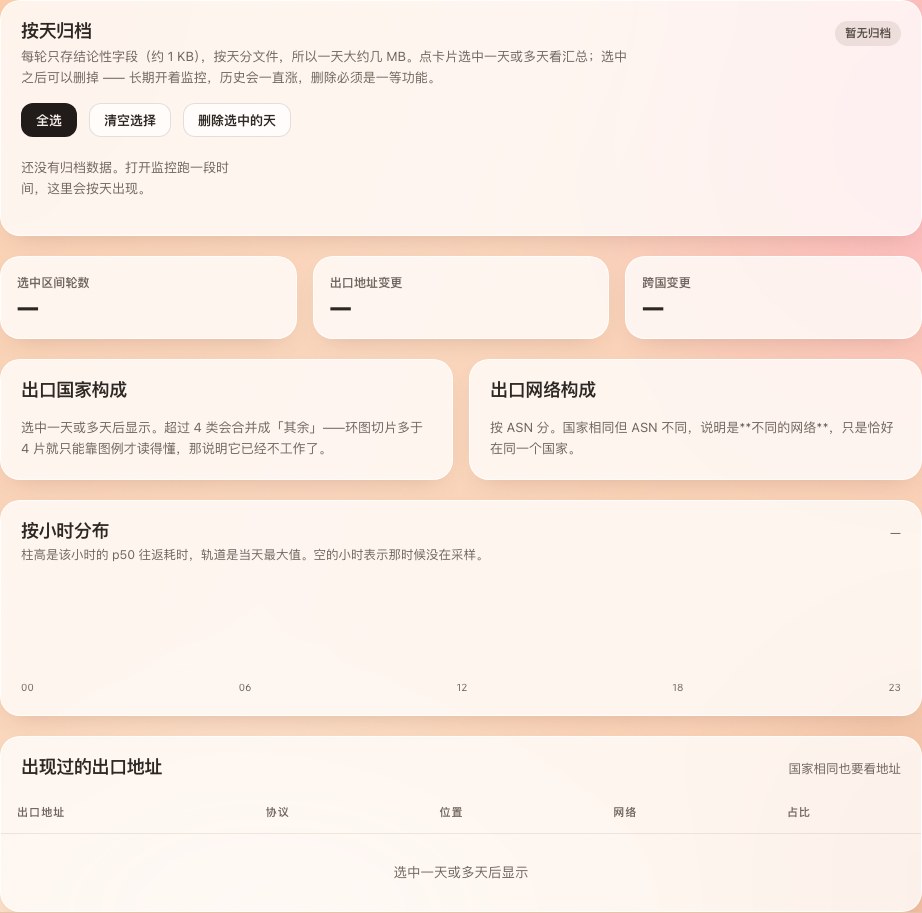
一个专门监控网络流量的工具,不该在你没同意之前就开始发请求。所以开关在页面右上角, 默认关闭,采样间隔可选 10 秒 / 30 秒 / 5 分钟。所有面板在没数据时显示的是「还没采样」, 而不是编一个 0 出来。 A tool whose whole job is watching network traffic should not send requests before you say so. The switch sits in the top bar, off by default, with a 10s / 30s / 5m interval. Every panel shows “nothing sampled yet” instead of inventing a zero.
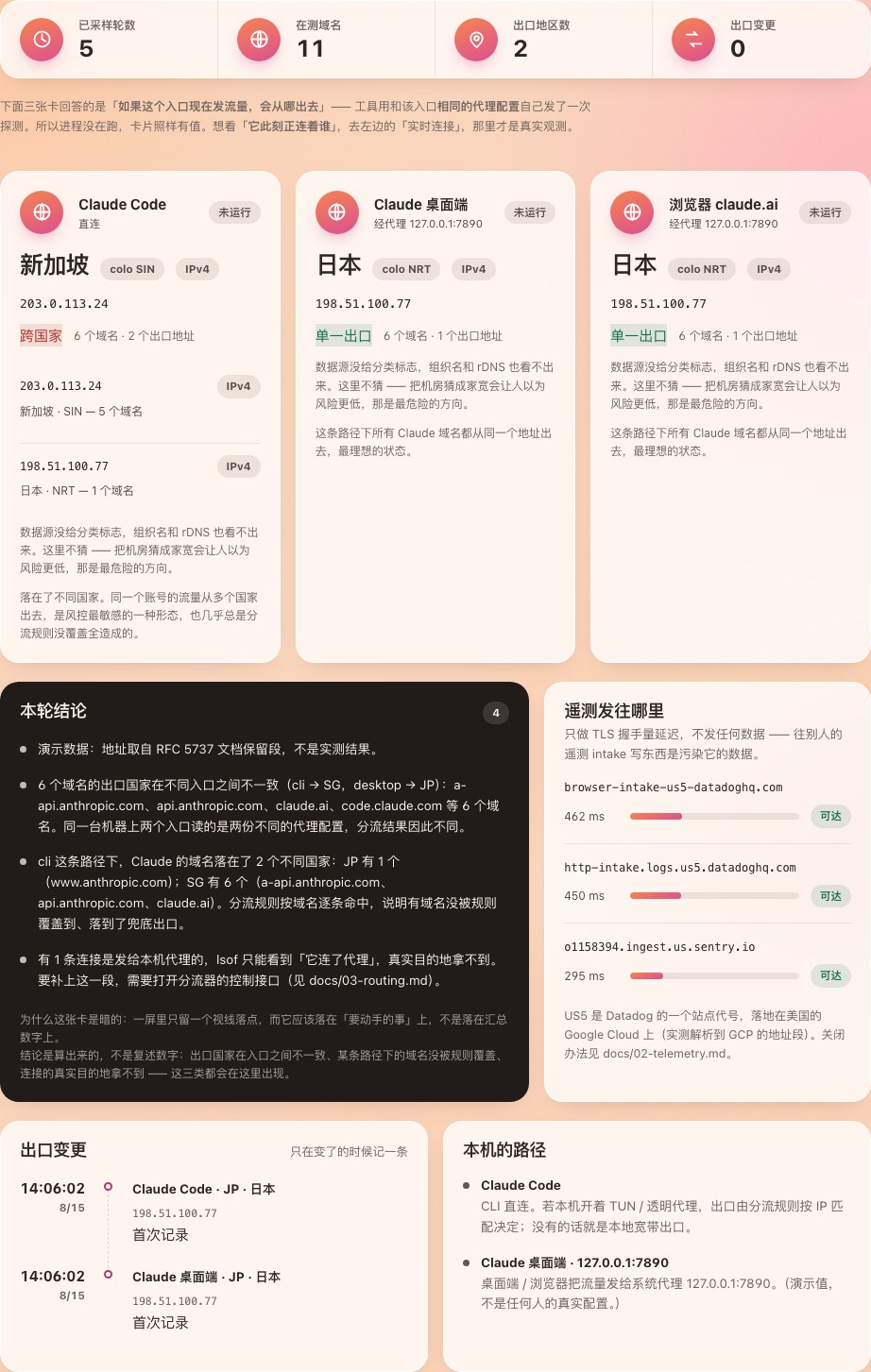
9 个面板:总览 / 逐域名 / 实时连接 / 延迟 / 路径质量 / 诊断 / 历史 / 解析对账 / 遥测字段panels: overview, by-domain, live sockets, latency, path quality, findings, history, DNS truth, telemetry fields
0 个第三方 Python 包 —— 只用标准库,clone 完就能跑third-party Python packages — stdlib only, runs straight after clone
4 档置信度:确证 / 较可能 / 推测 / 判不出。判不出就写判不出confidence levels: confirmed, likely, inferred, unknown. Unknown is written as unknown
~20k 条厂商官方 IP 前缀,用来确证「这是不是机房」vendor-published IP prefixes, used to confirm “is this a datacenter”
快速开始Quick start

不装包、不要 root、不改系统配置 No packages, no root, no system changes

Python 3.9+,macOS Python 3.9+, macOS

doctor 不联网,只读本机配置,先让你看清有哪几条路径。 确认无误再跑 probe 发第一轮探测。界面起来之后监控还是关的, 要自己在页面上打开。 doctor sends nothing — it only reads local configuration so you can see which paths exist. Then probe fires the first round. Even with the UI up, monitoring stays off until you turn it on.

完整的安装与长期运行说明 Full install and long-running setup
# 拿下来
git clone https://github.com/TbusOS/claude-egress-monitor.git
cd claude-egress-monitor

# 1. 看清本机三个入口各走哪条路(不发任何探测)
python3 -m cem doctor

# 2. 立刻采一轮,打印在终端
python3 -m cem probe

# 3. 起界面(监控默认关闭,在页面上按开关启动)
python3 -m cem serve --open

# 只想看界面长什么样、不联网:
python3 -m cem serve --demo --open
文档Documentation

八章,从取证方法到部署 Eight chapters, from evidence to deployment

每一章都给出可以自己跑一遍的复现命令,不要求你相信这里写的任何一句话。 章节正文目前只有中文,欢迎提 PR 翻译。 Every chapter ships commands you can run yourself — you are not asked to take any of this on faith. The chapters are currently Chinese only; translation PRs are very welcome.

参与维护Contributing

四条硬规矩 Four hard rules

这四条不是风格偏好,是这个工具能不能被信任的前提。完整的模块地图、 怎么加域名 / 加数据源 / 加诊断规则,都在 CONTRIBUTING 里。 These are not style preferences — they are the conditions under which this tool can be trusted at all. The full module map and how to add a domain, a data source or a diagnostic rule live in CONTRIBUTING.

1 · 仓库里不能有任何人的本机网络信息 1 · No one's local network details in the repo

出口 IP、代理端口、内网地址、运营商名、城市 —— 包括测试样本和代码注释里。 演示数据一律用 RFC 5737 文档保留段。 Exit IPs, proxy ports, private addresses, ISP names, cities — including inside test fixtures and code comments. Demo data always uses RFC 5737 documentation ranges.

2 · 不确定的结论必须标成推测 2 · Inferences must be labelled as inferences

四档置信度。判不出就写判不出 —— 尤其当猜错的方向不对称时, 把机房 IP 猜成家宽会让人以为风险更低。 Four levels. Unknown is written as unknown — especially where being wrong is asymmetric: calling a datacenter IP “home broadband” makes the risk look smaller than it is.

3 · 界面不发明数字 3 · The UI never invents a number

没有的值渲染成破折号,绝不用 0 或上一轮的值顶上。 一个假的 0 会被读成「延迟 0 毫秒」。 A missing value renders as a dash, never as 0 or last round's figure. A fake zero reads as “0 ms latency”.

4 · 结论只算 Claude 的域名 4 · Conclusions cover Claude's domains only

对照组域名混进结论会产生假警报,引导人去改一份没问题的配置。 假警报比漏报更消耗信任。 Letting a control-group domain into the conclusions produces false alarms that send people to edit a configuration that was fine. False alarms cost more trust than misses.